How to print text messages from iPhone without a computer
Without a computer, screenshots are the way Apple itself points to: its guide says a screenshot shows messages "just as they appear in a conversation". Take screenshots of the whole conversation, choose them on this page in Safari, and you get one PDF with every screenshot in order, numbered and dated, which you can print with AirPrint or save to Files. It's free and nothing is uploaded.
Why screenshots, and not an export?
Because the iPhone has no export. Apple’s iOS 27 guide has no print, export or PDF option for a Messages conversation, and its advice for showing messages to someone else is a screenshot: “To show the message bubbles and timestamps just as they appear in a conversation, send a screenshot as an attached image instead of forwarding messages” (Apple). Several new App Store apps advertise texts-to-PDF on the phone; we know of no Apple feature that lets an app read your Messages history directly, so check how any such app gets your messages before paying for it.
Step 1: How do you take good screenshots of a conversation?
- Open the conversation in Messages and scroll to where the part you need begins.
- Take a screenshot: on iPhones with Face ID, “quickly press and release the side button and the volume up button at the same time”; on iPhone SE, press the Home button and the side button together (Apple).
- Scroll up by a little less than one screen, so the next screenshot overlaps the last one, and take another. Repeat to the end.
- Keep the name or number at the top of the conversation visible, and make sure the dates and times you need are on screen.
- Don’t crop, draw on or edit them. Leave the originals in Photos (Collections › Media Types › Screenshots).
If you want a record of the scrolling itself, a screen recording also works (swipe down from the top-right corner to open Control Center, then the Screen Recording control). Keep it alongside; the PDF tool uses screenshots, not video.
Step 2: How do you turn the screenshots into one PDF?
Choose the screenshots below. On iPhone, the picker opens your photo library: select them all in one go.
Turn screenshots of a conversation into a PDF
Get the file: in WhatsApp, open the chat. iPhone: tap the contact or group name, then Export chat. Android: tap ⋮ › More › Export chat. Choose with or without media and save it (on iPhone, Save to Files). Then choose the .zip or .txt here.
Get the file: on Android, the free SMS Backup & Restore app saves your texts as an .xml file (its name starts with sms-). Choose that file here. Big backups with photos are fine: the file is read in small pieces, on your device.
Get the file: in Instagram or Facebook, go to Accounts Center › Your information and permissions › Export your information › Create export › Export to device. Pick Messages and set Format to JSON. When Meta's email arrives, download the zip and choose it here (if there are several zips, choose them all).
Get the file: in Telegram Desktop (on a computer), open the chat, click ⋮ › Export chat history, and set Format to Machine-readable JSON. Choose result.json here, or a zip of the export folder to include photos.
No export on iPhone? Take screenshots of the conversation (side button + volume up), then choose them here. Each one goes on a page in order, with its file name, date and SHA-256 fingerprint. Text in the screenshots is not read or retyped.
What page 1 will say
Preview of the messages
Pro is coming soon · $9.99 per export or $24.99 lifetime
- The clean PDF, with no “Preview” watermark on its pages
- A one-time price, no subscription
- Every source: WhatsApp, Android texts, Instagram, Messenger, Telegram, screenshots
Everything above is free while we launch. Leave your email and we'll write once, when Pro is ready.
Runs in your browser. Nothing is uploaded. No sign-up.
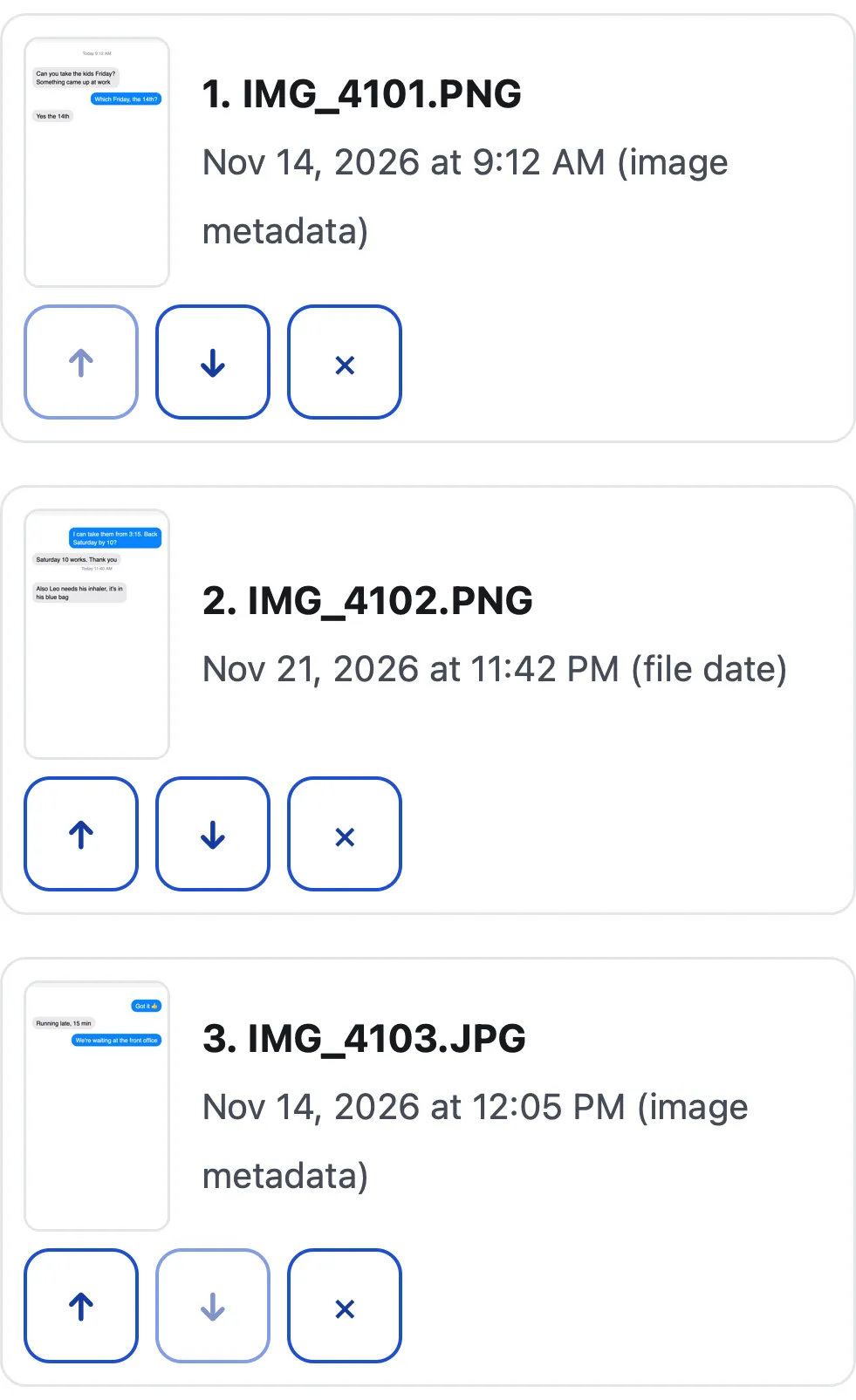
The tool lists them in order: by the date stored inside the images when every one has it, otherwise by the file dates, then by name. Use the arrows to fix the order or remove one, choose 1 or 2 screenshots per page, add a case title if you have one, and tap Make the PDF.
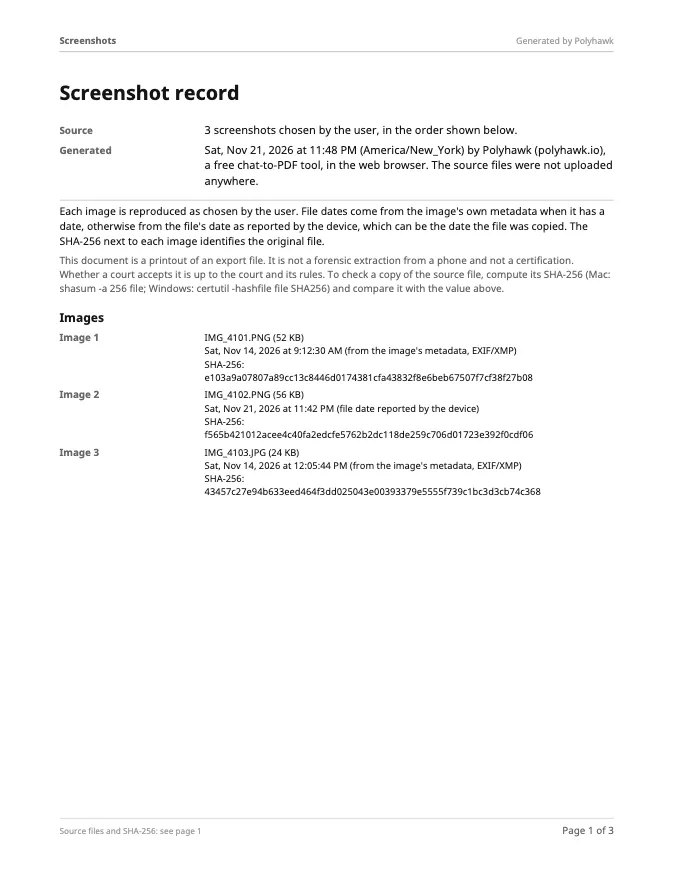
Page 1 of the PDF lists every screenshot with its file name, size, date and SHA-256 fingerprint; then come the screenshots, each captioned with its number, name and date. In our test, three screenshots became a 4-page PDF in 0.2 seconds (Safari’s engine, MacBook Air M4). The text in the screenshots is not read or retyped: they go into the PDF as they are.
Step 3: How do you print or share the PDF from the iPhone?
Tap Download PDF. Apple’s page on where to find downloads says downloaded files go to the Downloads folder in the Files app (in iCloud Drive or On My iPhone, depending on your settings), and Safari’s own Downloads list has it too. Or tap Share or save to Files to send it by Mail or Messages, or save it where you want.
To print, open the PDF, tap the Share button and tap Print. Apple’s AirPrint page notes that “Not all apps support printing” and that the printer and the iPhone must be “connected to the same Wi-Fi network”. No printer? Print it at a library, copy shop or the court’s self-help center.
Which date does the PDF show for each screenshot?
The date stored inside the image when there is one (from its EXIF or XMP data), otherwise the file date your device reports, which can be the date the file was copied rather than taken. Page 1 says which kind each one is. Apple’s Photos lets anyone change a photo’s date (“tap Adjust to edit the date and time”), so the times visible inside the screenshot matter more than any file date. The SHA-256 next to each image lets anyone check later that a screenshot hasn’t changed since the PDF was made.
When is a computer worth it?
For a conversation that runs to hundreds of screens, a Mac with Messages in iCloud, or desktop software that reads an iPhone backup, saves a lot of scrolling. How to print text messages from iPhone for court compares all three routes, and Decipher TextMessage alternative covers the best-known desktop tool. If the conversation is on WhatsApp, skip screenshots: WhatsApp has an export that keeps every timestamp.
Questions people ask
How do I print a whole text conversation on my iPhone?
The Messages app can't print a conversation, so take screenshots from the first message to the last, overlapping a little, choose them all on this page, make the PDF, then tap Share › Print to send it to an AirPrint printer.
Can I save iPhone text messages as a PDF without an app?
Yes. This page runs in Safari, so there's nothing to install: choose your screenshots, make the PDF and save it to Files or share it. Nothing is uploaded; the PDF is made on the phone.
Does a full-page screenshot work in Messages?
Apple's guide describes the Full Page option with Safari as its example ("you can capture an entire webpage in Safari") and doesn't list Messages. Plan on several normal screenshots for a long conversation.
How do I print from my iPhone without a printer at home?
Save the PDF to Files, then print it anywhere that can print a PDF: a library, a copy shop, a friend's computer, or the court's self-help center. Email it to yourself if that's easier.
Do screenshots show when each message was sent?
Only what Messages shows on screen when you take them, so make sure the dates and times you need are visible in each screenshot. The PDF adds each screenshot's own date and fingerprint, but it can't add times that aren't in the image.
Are these screenshots enough for court?
That's up to the court. Many courts accept printed screenshots when a participant confirms they're accurate and complete, and some ask more. Keep the phone and the conversation unchanged, and check your court's self-help pages.
Polyhawk is not a law firm and does not give legal advice. Whether a court accepts a document is up to the court and its rules; ask a lawyer or your court's self-help center.
Related
- iPhone texts for courtThe iPhone's Messages app can't print or export a conversation. The three ways that work, checked on Apple's iOS 27 guides, and what courts look for.
- Decipher TextMessage alternativeA fair comparison of Decipher TextMessage ($29.99, Windows and Mac) with a free browser tool that works on a phone, using each one's own published details.
- Texts in family courtPrint the whole conversation with numbers, dates and times, bring the copies your court asks for, and be ready to say it's accurate. With official sources.
- WhatsApp to PDFTurn a WhatsApp export (.zip or .txt, iPhone or Android) into a PDF with every message, date and time, photos inline and page numbers. Nothing uploaded.
- All guidesEvery Polyhawk guide, by task.