Save Android text messages as a PDF
Android's texting apps have no "export" or "print conversation" button. The free SMS Backup & Restore app saves your texts and MMS photos as an .xml file; choose it below, pick the conversation, and Polyhawk, a free chat-to-PDF tool, makes a PDF with every message, sender, date and time and the photos inline. In our test a 151 MB backup listed its 120 conversations in 0.3 seconds.
Turn Android texts (SMS Backup & Restore) into a PDF
Get the file: in WhatsApp, open the chat. iPhone: tap the contact or group name, then Export chat. Android: tap ⋮ › More › Export chat. Choose with or without media and save it (on iPhone, Save to Files). Then choose the .zip or .txt here.
Get the file: on Android, the free SMS Backup & Restore app saves your texts as an .xml file (its name starts with sms-). Choose that file here. Big backups with photos are fine: the file is read in small pieces, on your device.
Get the file: in Instagram or Facebook, go to Accounts Center › Your information and permissions › Export your information › Create export › Export to device. Pick Messages and set Format to JSON. When Meta's email arrives, download the zip and choose it here (if there are several zips, choose them all).
Get the file: in Telegram Desktop (on a computer), open the chat, click ⋮ › Export chat history, and set Format to Machine-readable JSON. Choose result.json here, or a zip of the export folder to include photos.
No export on iPhone? Take screenshots of the conversation (side button + volume up), then choose them here. Each one goes on a page in order, with its file name, date and SHA-256 fingerprint. Text in the screenshots is not read or retyped.
What page 1 will say
Preview of the messages
Pro is coming soon · $9.99 per export or $24.99 lifetime
- The clean PDF, with no “Preview” watermark on its pages
- A one-time price, no subscription
- Every source: WhatsApp, Android texts, Instagram, Messenger, Telegram, screenshots
Everything above is free while we launch. Leave your email and we'll write once, when Pro is ready.
Runs in your browser. Nothing is uploaded. No sign-up.
Why can’t you print texts straight from an Android phone?
Because the texting apps don’t offer it. We read Google’s Messages Help pages on backup, Messages for web and encryption and found no export, print or “save as PDF” feature for a conversation. Samsung’s own print guide notes that “Not all apps support printing their content”, and texting apps are among those that don’t. Samsung has also discontinued Samsung Messages on US phones running Android 12 or newer, starting July 6, 2026, so most Galaxy phones now use Google Messages.
The phone’s own backup (Google One, Samsung Cloud) is made to restore a phone, not to be read: you can’t open it as a file. That leaves two practical routes: screenshots, or a backup app that writes a readable file. For a long conversation, the backup is far better.
How do you back up texts with SMS Backup & Restore?
SMS Backup & Restore is made by SyncTech Pty Ltd. On November 22, 2026 Google Play showed 10M+ downloads and a 3.9-star rating from 132K reviews; it is free with ads.
- Install it from Google Play on the phone that has the texts.
- Start a backup and choose Messages (calls are a separate file). Keep the media/MMS option on if you want photos in the PDF.
- Choose where to save it. SyncTech lists “Google Drive, Dropbox, OneDrive and local storage on the phone”; the default folder is
/storage/emulated/0/SMSBackupRestore/. - Wait for it to finish. The file name starts with
sms-and ends in.xml. - On this page, tap the box above and choose that file (from Files, Downloads or Drive).
Back up from your own phone. This tool reads a file you made; it can’t reach anyone else’s messages, and it should never be used to.
What happens when you choose the backup?
The tool reads the file on your device in small pieces and lists every conversation with the contact name (when the backup has one), the number, how many messages and photos it holds, and the date of the last message:
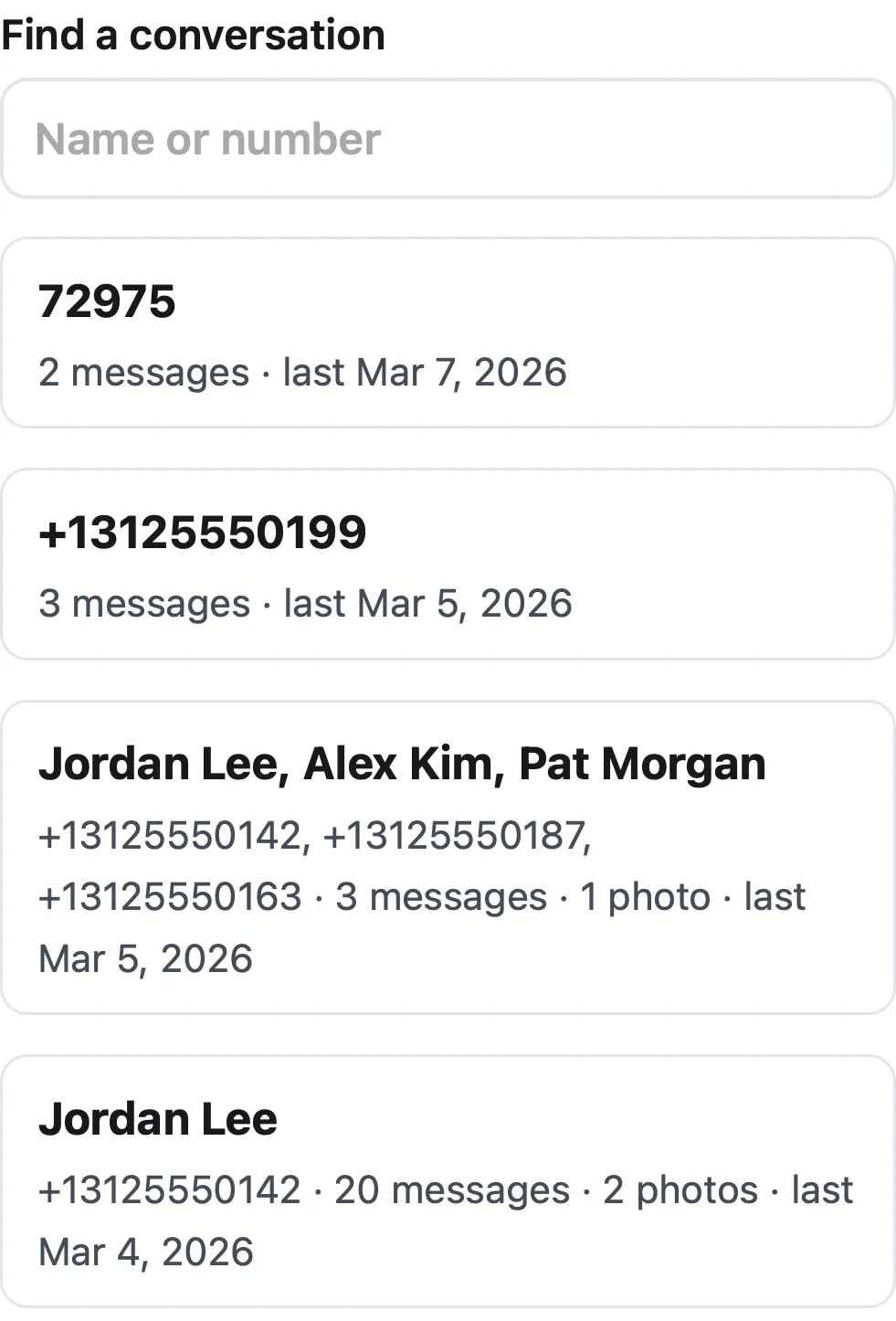
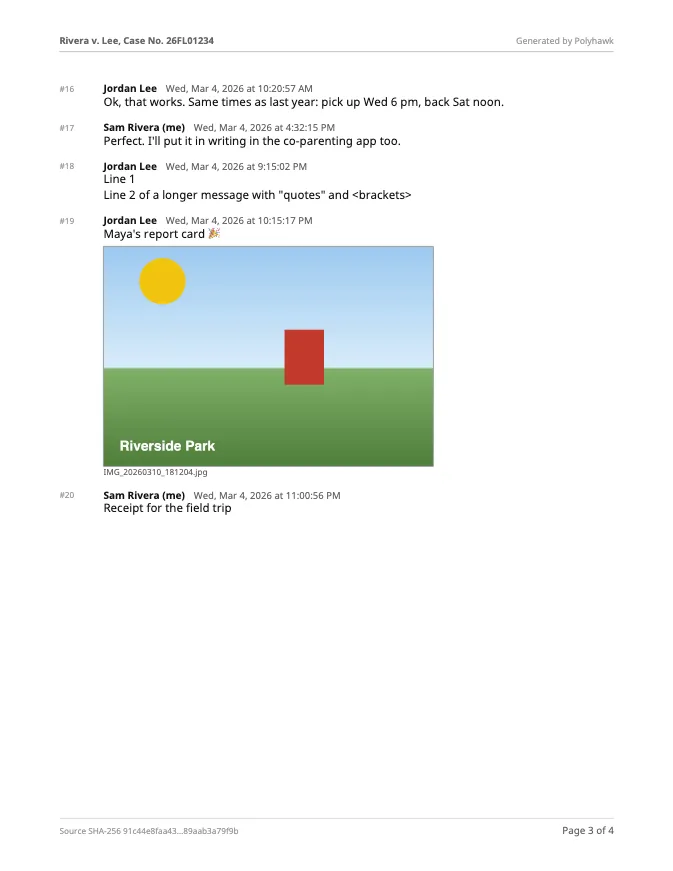
Pick one, and you’ll see the summary for page 1 and a preview of the first messages. A few things it handles that a plain viewer may not:
- The same number written three ways (
+13125550142,3125550142,(312) 555-0142) counts as one conversation. Our test file has all three for one contact, and the tool merges them. - Group MMS lists every number in the group, and the sender of each message.
- Drafts (type 3, never sent) are left out. Failed and outbox messages are kept and marked.
- Emoji stored as XML number codes (for example
��) are shown as the emoji itself. - Your messages: the backup marks which ones you sent. Type your name in Your name and it replaces “Me”.
How big a backup can it handle?
Backups with photos get big: every MMS picture is stored inside the .xml as text. A browser tab can’t load hundreds of megabytes as one document, so Polyhawk never does. It streams the file, skips over each photo while noting where it is, and reads back only the photos of the conversation you pick.
We built a 151 MB test backup (60,024 SMS and 405 MMS photos across 120 contacts) and timed it in Safari’s engine (Playwright WebKit 27.2) and Chrome’s engine (Chromium 159) on a MacBook Air (Apple M4, 16 GB):
| Step | WebKit | Chromium |
|---|---|---|
| List all 120 conversations | 0.3 s | 0.3 s |
| Open one conversation (504 messages, 3 photos) | 0.4 s | 0.3 s |
| Make its PDF (39 pages, 1.1 MB) | 1.0 s | 0.9 s |
Phones are slower than this laptop, but the file is never held in memory whole, which is what usually makes a browser tab crash on big backups.
What might be missing from an SMS backup?
Check the preview before you rely on the PDF. SyncTech’s FAQ notes two current limits: end-to-end encrypted RCS chats are marked “Restricted”, and a Google Messages bug since about May/June 2026 leaves outgoing RCS messages out of backups. If replies you know you sent are missing, that’s the likely reason; screenshots of those parts, made into a PDF with the Screenshots option, can fill the gap.
SMS Backup & Restore can print too. Why use this?
It can: since version 10.11.001 the app has Print from backups (to a printer or a PDF), and SyncTech’s online viewer also runs in your browser. If that’s all you need, use them. Polyhawk adds what people preparing for a hearing usually want: a summary page with the backup file’s SHA-256, your case title on every page, “Page X of Y”, numbered messages you can refer to, a date range, and phone-number masking. How to open an SMS Backup & Restore XML file compares the options, How to use text messages in small claims court covers money disputes, and How to print text messages from a Samsung for court walks through the Galaxy side. For WhatsApp chats, use WhatsApp to PDF.
Questions people ask
Can I print text messages from Android for court on my PC?
Yes, but not straight from the phone's texting app. Back up the texts with SMS Backup & Restore, copy the sms-….xml file to the computer (or keep it on the phone), choose it on this page and make the PDF, then print it. The same steps work in a phone's browser, without a PC.
Does SMS Backup & Restore save pictures from texts?
Yes, when its media backup is on. SyncTech's description of the file says an MMS part's data is "absent if media backup is turned off". If your PDF lists photos by name with "media backup was off", run a new backup with media.
Where does SMS Backup & Restore save the backup?
Wherever you choose: SyncTech lists "Google Drive, Dropbox, OneDrive and local storage on the phone", and the default folder on the phone is /storage/emulated/0/SMSBackupRestore/. Download it from the cloud to your phone or computer before choosing it here.
Can I use a Samsung Cloud or Smart Switch backup instead?
Not with this tool. Samsung's own page says of Samsung Cloud: "You cannot download your backups individually", and we found no Samsung page saying a Smart Switch backup can be opened and read on a computer. Use SMS Backup & Restore for a file you can read.
Which time zone are the times in?
The backup stores each message as an exact moment (milliseconds since 1970, UTC). Polyhawk shows them in your device's time zone unless you pick another one, and page 1 names the zone it used.
Is my call log included?
No. SMS Backup & Restore saves calls in a separate calls-….xml file. If you choose that file, the tool says so and asks for the messages file instead.
Polyhawk is not a law firm and does not give legal advice. Whether a court accepts a document is up to the court and its rules; ask a lawyer or your court's self-help center.
Related
- Open an SMS Backup & Restore fileAn sms-….xml backup is unreadable in a text editor. How to open it in SyncTech's viewers or as a conversation and PDF here, including very large backups.
- Samsung texts for courtGalaxy texting apps can't print a conversation. Back it up and turn it into a dated PDF, or use Scroll capture; checked on Samsung's and Google's pages.
- WhatsApp to PDFTurn a WhatsApp export (.zip or .txt, iPhone or Android) into a PDF with every message, date and time, photos inline and page numbers. Nothing uploaded.
- Texts in family courtPrint the whole conversation with numbers, dates and times, bring the copies your court asks for, and be ready to say it's accurate. With official sources.
- All Polyhawk toolsTurn your texts and chats into a clean PDF for court