How to print text messages from iPhone for court
The iPhone's Messages app has no print or export button: we checked all 32 Messages topics in Apple's iOS 27 guide. Three ways work: screenshots turned into one dated, numbered PDF (on the phone, free), printing from the Messages app on a Mac with Messages in iCloud, or desktop software that reads an iPhone backup. Whichever you use, keep the phone and the conversation.
Can you print texts straight from an iPhone?
No. We went through the Messages section of Apple’s iPhone User Guide for iOS 27 (32 topics, from setting up Messages to recovering deleted ones) and found no way to print, export or save a conversation as a PDF. The only thing in Messages that Apple says you can print is an attachment, such as a photo someone sent you.
What Apple does suggest, on its page about forwarding and sharing messages, is a screenshot: “To show the message bubbles and timestamps just as they appear in a conversation, send a screenshot as an attached image instead of forwarding messages.”
That leaves three routes that work. Pick by what you have:
| Route | Needs a computer | Cost | What you get |
|---|---|---|---|
| Screenshots → one PDF (this page) | No | Free | Every screenshot in order, numbered, with its date and SHA-256, plus a summary page |
| Messages app on a Mac | A Mac | Free | The conversation as the Mac shows it, printed or saved as PDF |
| Desktop backup software | Mac or PC, plus a backup | From $29.99 | The conversation read from an iPhone backup, as PDF |
Route 1: How do you turn iPhone screenshots into one PDF for court?
- Take the screenshots. On iPhones with Face ID, “quickly press and release the side button and the volume up button at the same time” (Apple). On iPhone SE, press the Home button and the side button together.
- Cover the whole conversation. Start where the relevant exchange begins, scroll a little less than a screen each time so screenshots overlap, and keep the contact’s name at the top visible. Don’t crop or mark them up.
- Find them in Photos › Collections › Media Types › Screenshots. Keep the originals there.
- Choose them below. The tool orders them by the date stored in each image (or the file date), then by name. Fix the order with the arrows if needed, add a case title, and make the PDF.
Turn screenshots of a conversation into a PDF
Get the file: in WhatsApp, open the chat. iPhone: tap the contact or group name, then Export chat. Android: tap ⋮ › More › Export chat. Choose with or without media and save it (on iPhone, Save to Files). Then choose the .zip or .txt here.
Get the file: on Android, the free SMS Backup & Restore app saves your texts as an .xml file (its name starts with sms-). Choose that file here. Big backups with photos are fine: the file is read in small pieces, on your device.
Get the file: in Instagram or Facebook, go to Accounts Center › Your information and permissions › Export your information › Create export › Export to device. Pick Messages and set Format to JSON. When Meta's email arrives, download the zip and choose it here (if there are several zips, choose them all).
Get the file: in Telegram Desktop (on a computer), open the chat, click ⋮ › Export chat history, and set Format to Machine-readable JSON. Choose result.json here, or a zip of the export folder to include photos.
No export on iPhone? Take screenshots of the conversation (side button + volume up), then choose them here. Each one goes on a page in order, with its file name, date and SHA-256 fingerprint. Text in the screenshots is not read or retyped.
What page 1 will say
Preview of the messages
Pro is coming soon · $9.99 per export or $24.99 lifetime
- The clean PDF, with no “Preview” watermark on its pages
- A one-time price, no subscription
- Every source: WhatsApp, Android texts, Instagram, Messenger, Telegram, screenshots
Everything above is free while we launch. Leave your email and we'll write once, when Pro is ready.
Runs in your browser. Nothing is uploaded. No sign-up.
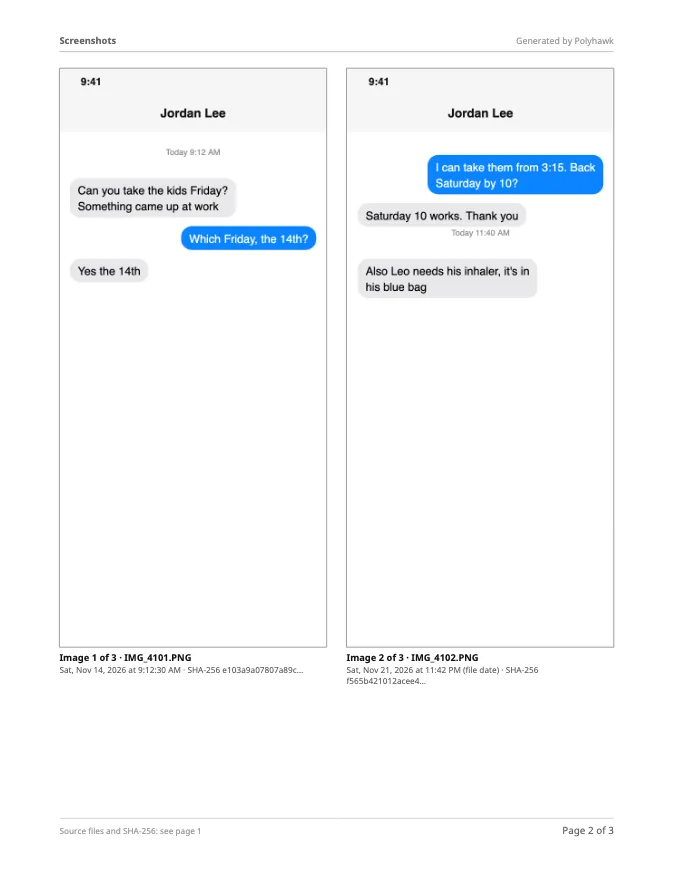
The PDF starts with a summary page listing every screenshot with its file name, date and SHA-256 fingerprint, then puts one screenshot per page (or two side by side), each captioned “Image 3 of 12 · IMG_4103.PNG” with its date. Three test screenshots became a 4-page PDF in 0.2 seconds in Safari’s engine on a MacBook Air (Apple M4). The tool doesn’t read or retype the text in the screenshots; the images are placed exactly as they are. How to print text messages from iPhone without a computer covers this route step by step, including printing from the phone.
Route 2: How do you print a conversation from a Mac?
If you have a Mac signed in to the same Apple Account, Messages in iCloud brings your conversations to it:
- On the iPhone: Settings › your name › iCloud › See All (or Show All) › Messages in iCloud › turn on Use on this iPhone (Apple).
- On the Mac: open Messages, choose Messages › Settings, click iMessage, select Enable Messages in iCloud. Give it time to download.
- Open the conversation and choose File › Print (Command-P). In the print dialog, open the PDF menu and choose Save as PDF to keep a file (Apple).
Two cautions. Apple’s page on printing a conversation exists in the macOS Sequoia 15 guide; in the macOS 27 guide that page is gone, though the keyboard shortcuts page still lists “Print the conversation, Command-P”. Check the result before relying on it. And the Mac only shows what’s stored: if Keep messages is set to 30 days, older messages aren’t there.
Route 3: What about desktop software?
Tools such as Decipher TextMessage and iMazing read a backup of your iPhone made on a computer and save conversations as PDF. As listed on their own sites on November 22, 2026: Decipher TextMessage is $29.99 one time, for Windows and Mac, and reads Finder or iTunes backups, not iCloud backups; iMazing is sold as a subscription (Personal: $49.99 a year for 5 devices) and needs a USB cable for the first connection. They suit long iMessage histories when you have a computer. Decipher TextMessage alternative compares it fairly with this site.
What do courts usually look for in printed texts?
Rules differ by court, so check yours, but self-help guides agree on the basics. The National Council of Juvenile and Family Court Judges’ guide says to “identify the phone number the text was sent from and the phone number where it was received”, to “explain that it is a complete and accurate copy”, and warns: “You will not be able to show them on your phone.” So:
- show the other person’s name and number at the top of the screenshots,
- include the whole relevant conversation, not single bubbles,
- make enough copies (often one each for the judge, the other side and you),
- keep the iPhone, unchanged, in case anyone disputes the printout.
How to present text messages in family court goes through exhibits and authentication in more detail, and How to use text messages in small claims court covers money disputes. If the conversation is on WhatsApp rather than Messages, export it to PDF instead: WhatsApp has an export, so you don’t need screenshots.
Questions people ask
How do I print text messages from my iPhone for a court hearing?
Take screenshots of the whole conversation and turn them into one PDF with each image's date and fingerprint (the tool on this page does it on the phone), or print the conversation from the Messages app on a Mac that has Messages in iCloud turned on, or use desktop software that reads an iPhone backup. Then make the number of copies your court asks for.
Can I print iPhone text messages for free?
Yes. Screenshots and this page's PDF tool cost nothing, and printing from the Messages app on a Mac you already own is free too. Paid desktop tools mainly save time on very long conversations.
Can I get my text messages from Apple?
Not as a printable record. Apple's Data & Privacy site (privacy.apple.com) explains the files in a copy of your data for iCloud Mail, Calendars and Reminders, Photos, Notes and Drive, with nothing for Messages. Apple also says that with Advanced Data Protection it "isn't able to access or provide copies" of end-to-end encrypted iCloud data.
Are screenshots of iPhone texts accepted in court?
Courts often see them, but whether they're admitted is up to the court and its rules. Judges usually want to know who took them, that they're complete and unedited, and which phone number each message came from. Keep the phone and the full conversation in case anyone questions them.
Can I print text messages from someone else's iPhone?
Use your own phone and your own conversations. Getting into another person's phone or account without permission can be against the law, and this site won't help with it.
Do printed iPhone texts need to show the date and time?
Court self-help guides say to show the date and time of each message and the number it came from. In Messages, check that the times are visible in your screenshots; the PDF adds each screenshot's own date and fingerprint, but it can't add times the screenshot doesn't show.
Polyhawk is not a law firm and does not give legal advice. Whether a court accepts a document is up to the court and its rules; ask a lawyer or your court's self-help center.
Related
- iPhone texts without a computerScreenshots are the only way Apple supports on the phone. Turn them into one numbered, dated PDF in Safari, then print with AirPrint or share it.
- Decipher TextMessage alternativeA fair comparison of Decipher TextMessage ($29.99, Windows and Mac) with a free browser tool that works on a phone, using each one's own published details.
- Texts in family courtPrint the whole conversation with numbers, dates and times, bring the copies your court asks for, and be ready to say it's accurate. With official sources.
- WhatsApp to PDFTurn a WhatsApp export (.zip or .txt, iPhone or Android) into a PDF with every message, date and time, photos inline and page numbers. Nothing uploaded.
- All guidesEvery Polyhawk guide, by task.