Export a WhatsApp chat to PDF
WhatsApp can't make a PDF itself: its Export chat option saves a .txt file, or a .zip with the photos. Choose that file below and Polyhawk, a free chat-to-PDF tool, turns it into a PDF with a summary page, every message with its sender, date and time, photos where they were sent, and "Page X of Y" on each page. In our test a 50,000-message chat took 3.0 seconds.
Turn a WhatsApp chat export into a PDF
Get the file: in WhatsApp, open the chat. iPhone: tap the contact or group name, then Export chat. Android: tap ⋮ › More › Export chat. Choose with or without media and save it (on iPhone, Save to Files). Then choose the .zip or .txt here.
Get the file: on Android, the free SMS Backup & Restore app saves your texts as an .xml file (its name starts with sms-). Choose that file here. Big backups with photos are fine: the file is read in small pieces, on your device.
Get the file: in Instagram or Facebook, go to Accounts Center › Your information and permissions › Export your information › Create export › Export to device. Pick Messages and set Format to JSON. When Meta's email arrives, download the zip and choose it here (if there are several zips, choose them all).
Get the file: in Telegram Desktop (on a computer), open the chat, click ⋮ › Export chat history, and set Format to Machine-readable JSON. Choose result.json here, or a zip of the export folder to include photos.
No export on iPhone? Take screenshots of the conversation (side button + volume up), then choose them here. Each one goes on a page in order, with its file name, date and SHA-256 fingerprint. Text in the screenshots is not read or retyped.
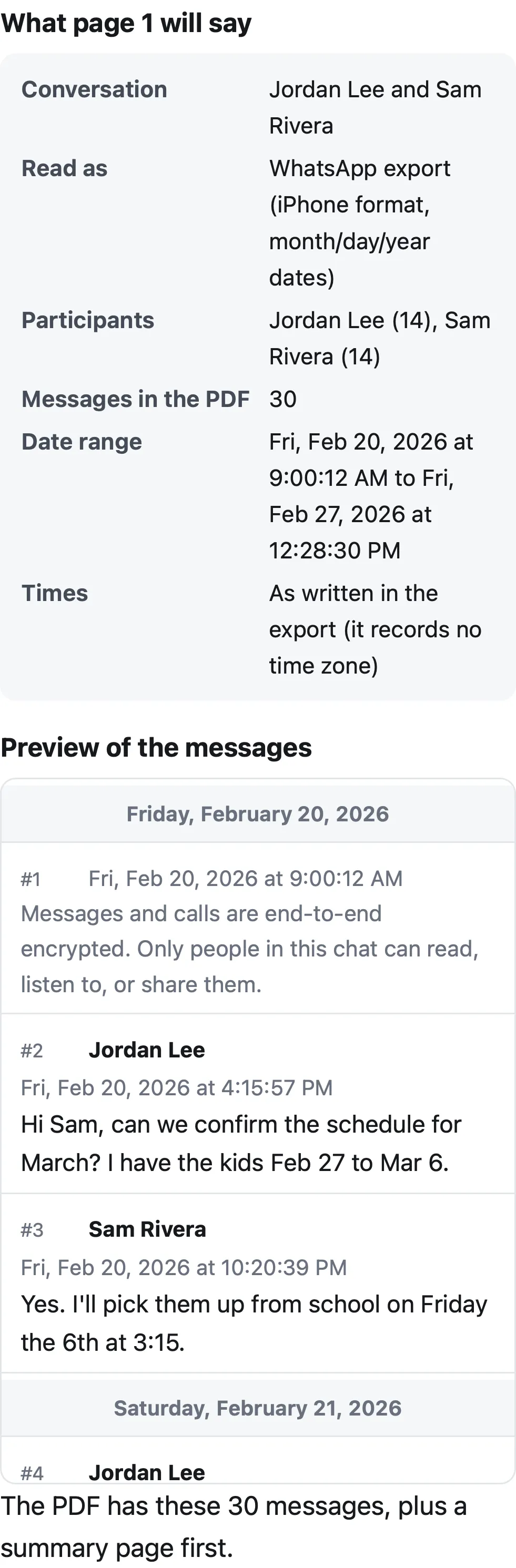
What page 1 will say
Preview of the messages
Pro is coming soon · $9.99 per export or $24.99 lifetime
- The clean PDF, with no “Preview” watermark on its pages
- A one-time price, no subscription
- Every source: WhatsApp, Android texts, Instagram, Messenger, Telegram, screenshots
Everything above is free while we launch. Leave your email and we'll write once, when Pro is ready.
Runs in your browser. Nothing is uploaded. No sign-up.
How do you export a WhatsApp chat on iPhone and Android?
The steps below are from WhatsApp’s Help Center, checked on November 22, 2026. Use the phone that has the conversation; the export is made on the device.
iPhone
- Open the chat in WhatsApp.
- Tap the contact’s name or the group name at the top.
- Tap Export chat.
- If the chat has media, choose With all media, With selected media… or Without media. WhatsApp says: “Your chat history will be exported as a ZIP file.”
- In the share sheet, tap Save to Files so you can choose the .zip in the tool above.
WhatsApp also notes that “View once messages will not be exported.”
Android
- Open the chat.
- Tap ⋮ (More options) › More › Export chat.
- Tap Without media or Include media.
- Choose where to send it, for example Google Drive, Gmail or Quick Share. With media, “the most recent media sent will be added as attachments”, so save all the files it offers. In the tool, select the .txt together with those photo files (or the .zip, if your phone made one).
WhatsApp Web also has ⋮ › Export chat, with All messages or a Custom date range, but “Media isn’t included”. The Help Center says the feature isn’t available in the Windows app.
What is inside a WhatsApp export file?
The two phone apps write different files, which is why printing the .txt directly gives a hard-to-read page:
| iPhone export | Android export | |
|---|---|---|
| File | a .zip holding _chat.txt |
WhatsApp Chat with Name.txt (plus media files) |
| A message line | [3/14/26, 6:22:05 PM] Jordan Lee: text |
14/03/2026, 18:22 - Jordan Lee: text |
| A photo | <attached: 00000015-PHOTO-2026-03-14-18-22-05.jpg> |
IMG-20260314-WA0004.jpg (file attached) |
| Exported without media | image omitted |
<Media omitted> |
The date follows your phone’s settings (month first in the US, day first in most other countries), the clock can be 12- or 24-hour, and iPhone exports put an invisible narrow space before AM/PM and invisible direction marks before attachments. Messages that span several lines continue on lines without a date. Edits show as <This message was edited> at the end of the message, and deleted messages as “This message was deleted”.
Polyhawk reads all of these: it works out the date order from the file itself, joins multi-line messages, marks edited and deleted messages, shows system lines (such as “created group” or “Missed voice call”) in gray, and puts each photo under the message it belongs to. We tested it on iPhone and Android exports, day-first UK and dotted German dates, and chats with Chinese, Arabic, Hebrew, Hindi and emoji, which all appear in the PDF as they do on the phone.
What does the WhatsApp PDF look like?
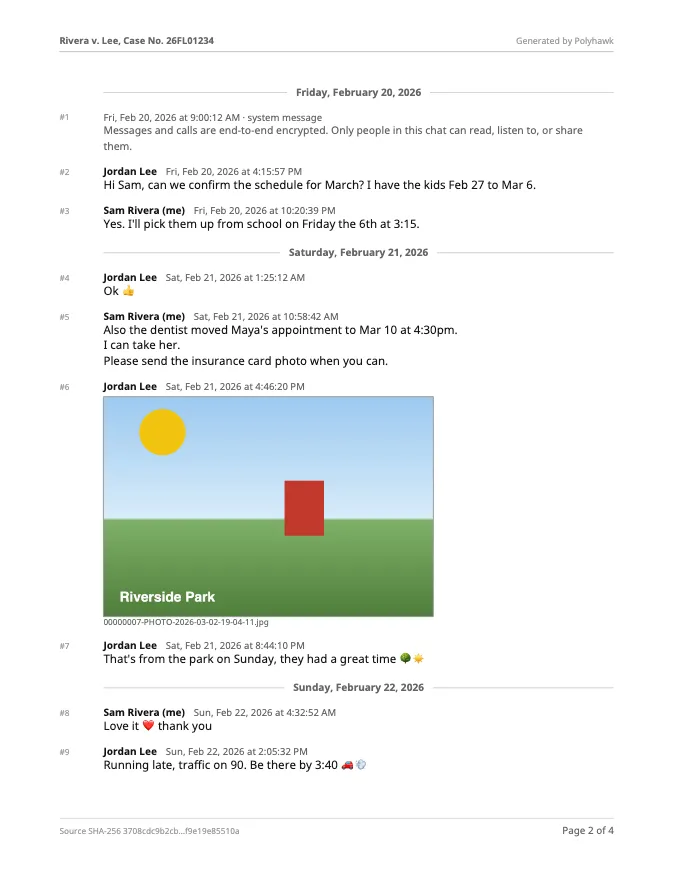
Page 1 is a summary: the conversation and participants (with message counts), how many messages are in the PDF, the first and last date, a plain statement about time zones, what media is included, the export file’s name and its SHA-256 fingerprint. Then every message follows in order, numbered, with the sender in bold and the date and time beside it, under a heading for each day.
Before you make the PDF, the tool shows what page 1 will say and the first 40 messages, so you can check the dates and names:
How long does a big WhatsApp chat take?
We timed the tool on fictional exports in Safari’s engine (Playwright WebKit 27.2) and Chrome’s engine (Chromium 159) on a MacBook Air (Apple M4, 16 GB, macOS 15.6), from clicking Make the PDF to the download being ready:
| Export | Pages | PDF size | WebKit | Chromium |
|---|---|---|---|---|
| iPhone export, 30 messages, 2 photos | 4 | 137 KB | 0.2 s | 0.2 s |
| Android group, 22 messages, photo and sticker | 4 | 114 KB | 0.2 s | 0.2 s |
| 50,000 messages, text only | 2,824 | 6.6 MB | 3.0 s | 3.0 s |
| 100,000 messages, text only | 5,557 | 10.6 MB | 5.5 s | 5.7 s |
A phone is slower than this laptop, but the tool works in small steps and shows its progress, so the page doesn’t freeze on a long chat. Reading the 50,000-message file took 0.15 seconds; nearly all the time goes into laying out 2,824 pages. An automated test builds the same PDF and reads it back to check that all 50,000 messages are in it, in order.
Which time does the PDF show for each message?
Exactly the time written in the export. WhatsApp writes each time in the exporting phone’s own clock and doesn’t say which time zone that was, so Polyhawk doesn’t convert anything, and page 1 says so in plain words. If the other person exported the same chat in another time zone, their times will differ from yours by that difference; that’s normal.
Should you include photos?
If the photos matter, yes. Photos and stickers appear inline under their message, at up to 300 points wide. Photos larger than 1,600 pixels are scaled down to keep the PDF small; tick Make the file smaller to shrink them further. Videos, voice notes and documents are listed by file name. Whatever you choose, keep the original export .zip unchanged: it holds the full-size files, and the SHA-256 on page 1 lets anyone confirm the PDF was made from that exact file.
Is a WhatsApp PDF enough for court?
That depends on the court, and no tool can promise it. A clean, complete, dated record helps, but courts usually also want someone who took part in the conversation to say it’s accurate, and the phone itself kept safe. How to save a WhatsApp chat for legal purposes covers the export, the fingerprint and what to keep, and How to present text messages in family court covers copies, exhibits and authentication. For Android texts, use Android texts to PDF; for Instagram or Messenger, Instagram DMs and Messenger to PDF; for Telegram, Telegram to PDF.
Questions people ask
Can WhatsApp export a chat as a PDF?
No. WhatsApp's Export chat makes a text file (a .zip on iPhone, with the photos if you choose media). WhatsApp's help page adds that "Your chat history can't be re-imported because it's a text file and not a backup file." To get a PDF you need a converter such as the one on this page, which reads that file in your browser.
How do I export a WhatsApp chat with photos?
On iPhone, tap the contact or group name, tap Export chat and choose With all media (or With selected media). On Android, tap ⋮ › More › Export chat › Include media. Then choose the .zip here and leave "Include photos" on.
Is there a limit on how many messages WhatsApp exports?
WhatsApp's help page states no limit today (we checked on November 22, 2026). Older versions of the same page said 10,000 messages with media and 40,000 without (2023), then "up to 100,000 latest messages" (2024 to April 2025). If your export seems short, check the first date in the preview before you make the PDF. WhatsApp export limits has the full history.
Can I export a WhatsApp chat from WhatsApp Web or a computer?
WhatsApp Web has Export chat (⋮ › Export chat) with "All messages" or a "Custom date range", but its help page says media isn't included. The help page for the Windows app says the feature isn't available there.
Why are the day and month swapped in my preview?
WhatsApp writes dates in your phone's format, and 03/04/26 can mean March 4 or April 3. Polyhawk works it out from the file (a day above 12, or the order of messages), but if every date is ambiguous you can switch "Dates in this export are" between month/day and day/month before making the PDF.
Are voice notes and videos in the PDF?
A PDF can't play them, so they appear as a line with their file name, for example "[Audio or voice note: PTT-20260315-WA0002.opus]". Keep the original export .zip, which holds the files themselves.
Is my WhatsApp chat uploaded anywhere?
No. Your browser opens the export and builds the PDF on your device. The chat, photos and PDF never reach our server. See the privacy policy.
Polyhawk is not a law firm and does not give legal advice. Whether a court accepts a document is up to the court and its rules; ask a lawyer or your court's self-help center.
Related
- Save a WhatsApp chat for legal useExport the chat with media from your own phone, keep the original .zip unchanged, and make a dated PDF that records the file's SHA-256 fingerprint.
- Android texts to PDFBack up your Android texts with SMS Backup & Restore, then turn one conversation into a PDF with every date, sender and MMS photo. Nothing uploaded.
- Instagram and Messenger to PDFDownload your messages from Meta in JSON, then turn one Instagram or Messenger conversation into a dated PDF with photos. Free, nothing uploaded.
- Texts in family courtPrint the whole conversation with numbers, dates and times, bring the copies your court asks for, and be ready to say it's accurate. With official sources.
- All Polyhawk toolsTurn your texts and chats into a clean PDF for court