How to present text messages in family court
Courts generally want a printed, complete copy of the conversation showing who sent each message, from which number or account, and when, plus a person who can say it's accurate. California's court self-help guide says to make 3 copies of each document (one for you, one for the other side, one for the court file). Rules differ by court, so check yours; this page is general information, not legal advice.
What do family courts usually expect from text messages?
Every court has its own rules, but the official self-help guides we checked agree on the basics:
- Paper, not the phone. The National Council of Juvenile and Family Court Judges (NCJFCJ) guide says: “You will not be able to show them on your phone.” A California county court’s handout says a text must be brought “in a form (for example: printed out) that can be marked as an exhibit and left with the court.”
- Who, which number, when. The same NCJFCJ guide says to “identify the phone number the text was sent from and the phone number where it was received” and to “explain that it is a complete and accurate copy of the text message.” Ohio Legal Help says to capture “The sender’s identity, number and contact information, and the time and date the message was sent.”
- The whole conversation. Ohio Legal Help: “That can mean showing an entire conversation.” A guide from NCJFCJ’s resource center: “Courts often want to see entire conversations.”
- Copies, in time. The California Courts Self-Help Guide says: “Make 3 copies of any document you want the judge to see. One copy is yours, one is for the other side, and one is for your court file.” For some hearings, “The judge may not consider them if they weren’t filed and served before your court date.”
Details really do differ: Colorado’s legal help center says to “Label each exhibit in the lower-right hand corner of the first page”, while California’s guide on introducing exhibits says “Don’t label or mark your exhibits before your trial”. Read your own court’s pages.
How are text messages authenticated?
“Authentication” means showing the messages are what you say they are. In US federal courts, Rule 901(a) of the Federal Rules of Evidence asks for “evidence sufficient to support a finding that the item is what the proponent claims it is”. Its examples include “Testimony that an item is what it is claimed to be” from a witness with knowledge (for texts, usually someone in the conversation) and “distinctive characteristics of the item, taken together with all the circumstances”, such as the number, names, nicknames and what the messages talk about.
A chart used to train North Carolina judges (UNC School of Government, April 2025) puts it as two questions: does the exhibit “accurately reflect the communication”, and “Is there reason to believe that the purported author wrote the communication?” It adds that North Carolina’s bar is “not high—only a prima facie showing is required.” State courts follow their own evidence rules, so the exact test where you live may differ. In practice, that means being ready to:
- say how you got the printout (for example, “I exported the chat from my phone on March 3 and made this PDF from the file”),
- explain how you know who the other person is (their number, things only they would know),
- show the conversation is complete, and
- keep the phone and the original export file unchanged.
Step by step: how do you prepare your messages?
- Get them from your own phone, the best way your app allows: WhatsApp has an export (WhatsApp to PDF); Android texts can be backed up with SMS Backup & Restore (Samsung guide); iPhone texts need screenshots, a Mac or desktop software (iPhone guide).
- Make one PDF per conversation, with your case title on every page. Choose your export or screenshots here:
Turn a WhatsApp chat export into a PDF
Get the file: in WhatsApp, open the chat. iPhone: tap the contact or group name, then Export chat. Android: tap ⋮ › More › Export chat. Choose with or without media and save it (on iPhone, Save to Files). Then choose the .zip or .txt here.
Get the file: on Android, the free SMS Backup & Restore app saves your texts as an .xml file (its name starts with sms-). Choose that file here. Big backups with photos are fine: the file is read in small pieces, on your device.
Get the file: in Instagram or Facebook, go to Accounts Center › Your information and permissions › Export your information › Create export › Export to device. Pick Messages and set Format to JSON. When Meta's email arrives, download the zip and choose it here (if there are several zips, choose them all).
Get the file: in Telegram Desktop (on a computer), open the chat, click ⋮ › Export chat history, and set Format to Machine-readable JSON. Choose result.json here, or a zip of the export folder to include photos.
No export on iPhone? Take screenshots of the conversation (side button + volume up), then choose them here. Each one goes on a page in order, with its file name, date and SHA-256 fingerprint. Text in the screenshots is not read or retyped.
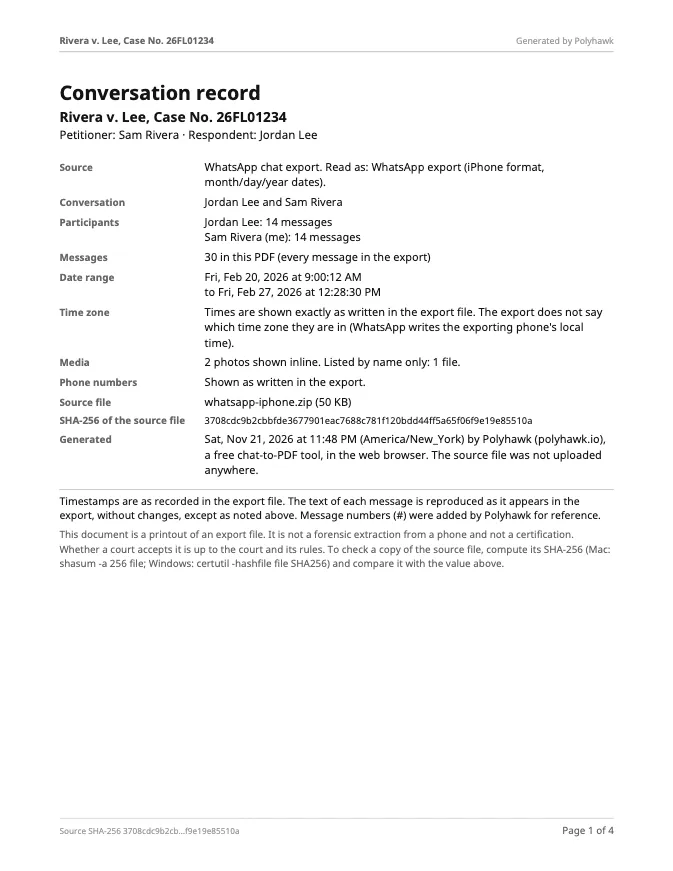
What page 1 will say
Preview of the messages
Pro is coming soon · $9.99 per export or $24.99 lifetime
- The clean PDF, with no “Preview” watermark on its pages
- A one-time price, no subscription
- Every source: WhatsApp, Android texts, Instagram, Messenger, Telegram, screenshots
Everything above is free while we launch. Leave your email and we'll write once, when Pro is ready.
Runs in your browser. Nothing is uploaded. No sign-up.
- Read it through before the hearing. Note the message numbers (#) of the messages you will point to, so you can say “message 1,204 on page 37” instead of leafing through.
- Don’t mark up the exhibit itself. If you want to highlight messages, make a separate list for yourself.
- Make the copies your court asks for, and file or serve them by the deadline it gives.
- Bring the phone and keep the original export file, unchanged, in case the other side questions the printout.
The PDF made here helps with steps 2 to 4: page 1 records where it came from (the source file’s name and SHA-256 fingerprint, the participants, the message count, the date range, which time zone the times are in, and what media is included), each message is numbered, and every page carries your case title and “Page X of Y”. It shows every message as it appears in the export file; it doesn’t change, add or drop any.
Does the SHA-256 fingerprint authenticate the messages?
No, and we don’t claim it does. The fingerprint identifies the export file the PDF was made from, so anyone can check that the two match. In federal courts, Rule 902(14) allows some electronic copies to be authenticated “by a process of digital identification”, which its committee note says is “ordinarily” a “hash value”, but only with “a certification of a qualified person” and notice to the other side. Whether the messages are genuine is still shown by testimony and the other evidence above. How to save a WhatsApp chat for legal purposes explains how to keep the export file safe.
What about family courts in England and Wales?
Bundles there now work differently. Practice Direction 27A, in force since 2 March 2026, says “copies of emails, text messages, WhatsApp messages or any form of social media communications” must not go in the court bundle “unless the court directs otherwise”, though specific documents “it is necessary for the court to read or which will actually be referred to during the hearing” may be included. Electronic bundles must be PDFs of up to 350 pages. A date range in the tool helps you make a short PDF of just the messages the court needs.
Where can you get help with your case?
This site isn’t a law firm and can’t give legal advice. If your case is about money (a deposit, a repair, a loan), see How to use text messages in small claims court. Free and low-cost help:
- your court’s self-help center (in California, the self-help center finder);
- LawHelp.org, which lists nonprofit legal aid by state;
- the Legal Services Corporation legal aid finder;
- ABA Free Legal Answers, where volunteer lawyers answer civil questions online in participating states.
Questions people ask
Can text messages be used in family court?
Often, yes: court self-help guides list text messages among the kinds of evidence people bring. Whether a particular printout is admitted is up to the judge, under that court's rules of evidence.
Are screenshots of text messages admissible in court?
They can be. The questions are usually whether the screenshots accurately show the messages and whether the person said to have sent them really did. A participant's testimony, the full conversation, visible numbers and dates, and the phone kept unchanged all help. A judge decides.
How do I authenticate text messages for court?
In general terms, by giving the court enough to find that the messages are what you say they are. Under the federal rule (FRE 901), examples include testimony from someone with knowledge, such as a person in the conversation, and distinctive characteristics such as the phone number, names and content. State rules are similar but not identical; ask your court's self-help center.
How many copies of my text messages should I bring?
California's self-help guide says 3 (you, the other side, the court file); a California county court asks for 4 for some hearings. Check your court's own rules or ask the clerk.
Can I show the judge the texts on my phone?
Usually not. The NCJFCJ guide says "You will not be able to show them on your phone", and a California county court says it "will not be able to look at the item on your phone or computer". Bring printed copies, and the phone in case questions come up.
Should I number or label my exhibits?
It depends on the court: Colorado's legal help center says to label each exhibit in the lower-right corner, while California's self-help guide says not to label them before trial. Follow your court's instructions.
Can I use text messages from someone else's phone?
Use your own phone and your own conversations. Getting into another person's phone or account without permission can be against the law and can hurt your case. Talk to a lawyer before using anything you didn't receive yourself.
Polyhawk is not a law firm and does not give legal advice. Whether a court accepts a document is up to the court and its rules; ask a lawyer or your court's self-help center.
Related
- iPhone texts for courtThe iPhone's Messages app can't print or export a conversation. The three ways that work, checked on Apple's iOS 27 guides, and what courts look for.
- Samsung texts for courtGalaxy texting apps can't print a conversation. Back it up and turn it into a dated PDF, or use Scroll capture; checked on Samsung's and Google's pages.
- Save a WhatsApp chat for legal useExport the chat with media from your own phone, keep the original .zip unchanged, and make a dated PDF that records the file's SHA-256 fingerprint.
- WhatsApp to PDFTurn a WhatsApp export (.zip or .txt, iPhone or Android) into a PDF with every message, date and time, photos inline and page numbers. Nothing uploaded.
- All guidesEvery Polyhawk guide, by task.