How to use text messages in small claims court
Small claims courts take text messages as evidence: a California court's self-help center lists "Letters, Emails, Texts" among the evidence you can bring. Print the whole conversation with names, numbers, dates and times, bring 3 copies (you, the judge, the other side) unless your court says otherwise, and be ready to point to the messages that prove your claim. This is general information, not legal advice.
Do small claims courts accept text messages?
Yes, as a rule. The Santa Cruz Superior Court Self Help Center’s handout, “Preparing for a Small Claims Trial”, answers “What is ‘evidence’ in Small Claims Court?” with a list that includes “Letters, Emails, Texts”, along with receipts, estimates, photographs and calendar entries.
The standard you have to meet is also spelled out there: you prove your case “by a preponderance of the evidence”, which “means you need to prove enough to make it more likely than not that the facts you are proving are true.” In a dispute over a deposit, a repair, a sale or a loan, texts are often the clearest proof of what was agreed and when.
Small claims procedure is set by each state and court, and the pages quoted here are from California counties. Read your own court’s self-help pages too.
Which texts should you bring?
The ones that prove each part of your claim, in their full context:
- The agreement: the price, the deposit, the deadline, the promise to pay back (“I’ll pay you the $600 by the 15th”).
- The problem: messages about the damage, the missed payment, the job not finished.
- Your requests: when you asked to be paid or for the work to be fixed, and the answers (or the silence).
- The whole conversation around them. A single message out of context is easy to dispute. Include what came before and after.
Number them in your notes so you can say “the message on March 3 at 9:41 PM, number 214 on page 9” when the judge asks.
How do you print the texts with dates and names?
The best way depends on the app; each guide below has the exact steps:
- WhatsApp: use the app’s Export chat, then WhatsApp to PDF.
- Android texts: back up with SMS Backup & Restore, then Android texts to PDF.
- iPhone texts: screenshots made into one PDF, or a Mac: How to print text messages from iPhone for court.
Then choose your file here and make one PDF per conversation. Add the case number as the case title, set the date range to the period of the dispute, and check the preview:
Turn Android texts (SMS Backup & Restore) into a PDF
Get the file: in WhatsApp, open the chat. iPhone: tap the contact or group name, then Export chat. Android: tap ⋮ › More › Export chat. Choose with or without media and save it (on iPhone, Save to Files). Then choose the .zip or .txt here.
Get the file: on Android, the free SMS Backup & Restore app saves your texts as an .xml file (its name starts with sms-). Choose that file here. Big backups with photos are fine: the file is read in small pieces, on your device.
Get the file: in Instagram or Facebook, go to Accounts Center › Your information and permissions › Export your information › Create export › Export to device. Pick Messages and set Format to JSON. When Meta's email arrives, download the zip and choose it here (if there are several zips, choose them all).
Get the file: in Telegram Desktop (on a computer), open the chat, click ⋮ › Export chat history, and set Format to Machine-readable JSON. Choose result.json here, or a zip of the export folder to include photos.
No export on iPhone? Take screenshots of the conversation (side button + volume up), then choose them here. Each one goes on a page in order, with its file name, date and SHA-256 fingerprint. Text in the screenshots is not read or retyped.
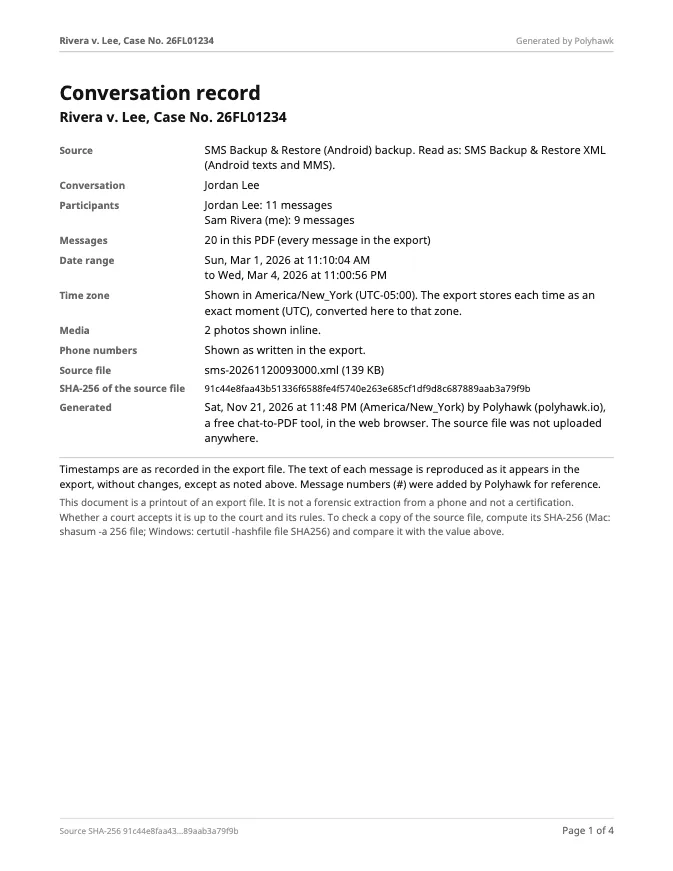
What page 1 will say
Preview of the messages
Pro is coming soon · $9.99 per export or $24.99 lifetime
- The clean PDF, with no “Preview” watermark on its pages
- A one-time price, no subscription
- Every source: WhatsApp, Android texts, Instagram, Messenger, Telegram, screenshots
Everything above is free while we launch. Leave your email and we'll write once, when Pro is ready.
Runs in your browser. Nothing is uploaded. No sign-up.
The PDF starts with a summary page (who’s in the conversation, how many messages, the date range, which time zone the times are in, and the source file’s SHA-256 fingerprint), then every message numbered, with sender, date and time, and “Page X of Y” at the bottom.
How many copies do you need?
California courts say slightly different things, which is why it’s worth reading your own:
| Court (California) | What it says |
|---|---|
| Santa Cruz | “Bring 3 copies of everything (including photographs)”: one for you, one for the judicial officer, one for the opposing party |
| San Mateo | “Generally, you should have at least 3 copies of all evidence you intend to present at trial” |
| Orange County | “Make 2 copies of any paper you want to give the judge so that you and the other party have a copy”, and “If you can, bring originals and not copies” |
San Mateo’s guide also says to “Organize your evidence and label it clearly so you can hand it to the judge when you need to, even if you get nervous”, and that “The original documents should be kept clean and unmarked”. Orange County’s page asks you to “Bring all the evidence that will help the judge understand the case.”
What will the judge ask about your texts?
Expect questions. Santa Cruz’s handout warns: “Expect the Judicial Officer to interrupt you.” About texts, the usual questions are:
- Who sent them? Point to the number or name at the top and to what the messages say.
- Is this the whole conversation? Say so if it is, or explain what period it covers.
- How did you make the printout? “I exported the chat from my phone on March 3 and printed it” is a full answer. If you used this tool, page 1 records the file and the date range.
- Do you still have the messages? Bring the phone with the conversation on it.
If a witness can’t come, the Santa Cruz handout says their statement “must be written and signed under penalty of perjury” and includes a sample on its second page.
Where can you get free help with a small claims case?
Your court’s self-help center is the first stop; in California, the statewide self-help center finder lists them. LawHelp.org lists nonprofit legal aid by state. For family matters rather than a money dispute, see How to present text messages in family court.
Questions people ask
Can text messages be used as evidence in small claims court?
Yes, generally. The Santa Cruz Superior Court's self-help center lists "Letters, Emails, Texts" among small claims evidence. The judge decides how much weight to give them, so show the whole exchange and be ready to say how you got the printout.
How many copies of my text messages do I need for small claims?
Usually 3: Santa Cruz says "Bring 3 copies of everything (including photographs)", one for you, one for the judge and one for the other party, and San Mateo says "at least 3 copies". Orange County says "Make 2 copies" and to bring originals if you can. Follow your own court's page.
Do I need to bring my phone to small claims court?
Bring it, with the conversation still on it, in case the judge or the other side asks about the messages. But bring paper copies too, so the judge and the other side each have one to read and keep.
Are screenshots good enough for small claims?
They can be, if they show who sent each message, the number or name, the dates and times, and the whole relevant exchange. An export from the app (WhatsApp, Android backups) shows every timestamp and is easier to read.
Can I highlight the important messages?
Mark up your own copy, not the ones you hand over. San Mateo's guide says to keep a copy "so you can refer to it and mark it up as needed", while "The original documents should be kept clean and unmarked".
What if the other person denies sending the texts?
You tell the judge how you know they came from that person: their number, their name in your contacts, what the messages say, and how the conversation went. The judge decides who is more believable.
Polyhawk is not a law firm and does not give legal advice. Whether a court accepts a document is up to the court and its rules; ask a lawyer or your court's self-help center.
Related
- Texts in family courtPrint the whole conversation with numbers, dates and times, bring the copies your court asks for, and be ready to say it's accurate. With official sources.
- Android texts to PDFBack up your Android texts with SMS Backup & Restore, then turn one conversation into a PDF with every date, sender and MMS photo. Nothing uploaded.
- iPhone texts for courtThe iPhone's Messages app can't print or export a conversation. The three ways that work, checked on Apple's iOS 27 guides, and what courts look for.
- WhatsApp to PDFTurn a WhatsApp export (.zip or .txt, iPhone or Android) into a PDF with every message, date and time, photos inline and page numbers. Nothing uploaded.
- All guidesEvery Polyhawk guide, by task.