Save Instagram DMs and Messenger chats as a PDF
Instagram and Messenger have no "save chat as PDF" button. Ask Meta for your messages (Accounts Center › Export your information) in JSON format, then choose the zip below: Polyhawk, a free chat-to-PDF tool, lists your conversations, joins Meta's split message files, fixes the garbled accents and emoji in Meta's JSON, and makes a PDF with every message, date and photo.
Turn Instagram or Messenger messages into a PDF
Get the file: in WhatsApp, open the chat. iPhone: tap the contact or group name, then Export chat. Android: tap ⋮ › More › Export chat. Choose with or without media and save it (on iPhone, Save to Files). Then choose the .zip or .txt here.
Get the file: on Android, the free SMS Backup & Restore app saves your texts as an .xml file (its name starts with sms-). Choose that file here. Big backups with photos are fine: the file is read in small pieces, on your device.
Get the file: in Instagram or Facebook, go to Accounts Center › Your information and permissions › Export your information › Create export › Export to device. Pick Messages and set Format to JSON. When Meta's email arrives, download the zip and choose it here (if there are several zips, choose them all).
Get the file: in Telegram Desktop (on a computer), open the chat, click ⋮ › Export chat history, and set Format to Machine-readable JSON. Choose result.json here, or a zip of the export folder to include photos.
No export on iPhone? Take screenshots of the conversation (side button + volume up), then choose them here. Each one goes on a page in order, with its file name, date and SHA-256 fingerprint. Text in the screenshots is not read or retyped.
What page 1 will say
Preview of the messages
Pro is coming soon · $9.99 per export or $24.99 lifetime
- The clean PDF, with no “Preview” watermark on its pages
- A one-time price, no subscription
- Every source: WhatsApp, Android texts, Instagram, Messenger, Telegram, screenshots
Everything above is free while we launch. Leave your email and we'll write once, when Pro is ready.
Runs in your browser. Nothing is uploaded. No sign-up.
How do you download your Instagram messages?
Meta has renamed this flow: it’s now Export your information, not “Download your information”. These steps are from Instagram’s Help Center, checked on November 22, 2026. In the Instagram app:
- Open Instagram’s settings and tap Accounts Center (Instagram says you may see Meta Account instead).
- Tap Your information and permissions, then Export your information.
- Tap Create export, select your Instagram profile and tap Next.
- Select Export to device.
- Choose Specific types of information and tick Messages. Set the date range, set Format to JSON, and choose the media quality.
- Tap Start export.
Instagram says “It may take up to 30 days for us to email you an export link”, and once it’s ready “you’ll have 4 days to export your information in the Available downloads section”. Download the zip to your phone or computer, then choose it in the tool above. It works on a computer the same way, from More › Settings in instagram.com.
How do you download Facebook Messenger chats?
From Facebook’s Help Center: open Facebook, tap your profile picture or the menu, then Settings & privacy › Settings › Meta Account › Your information and permissions › Export your information › Create export › Export to device. Pick Messages, a date range and Format: JSON (“A machine readable format”), then start the export. You have 4 days to download it once it’s ready.
End-to-end encrypted Messenger chats are downloaded separately. Meta’s help page says this “is currently only available on a computer”: open facebook.com, click Messenger, click Options next to Chats, then Chat history › Last backup › Download chat backup. Meta doesn’t say what format this file is in. The downloads we know of from open-source tools are JSON files with a shared media folder; Polyhawk reads that layout, and our test file is built to it.
Where are the messages inside Meta’s zip?
Each conversation is a folder named after the other person plus a number, holding message_1.json, message_2.json and so on, newest messages first, with photos, videos and audio folders beside them. The top folder has changed over the years: messages/ in older downloads, your_instagram_activity/messages/ on Instagram, and your_activity_across_facebook/messages/ or your_facebook_activity/messages/ on Facebook. Inside it, chats are split into inbox, message_requests, archived_threads, filtered_threads and e2ee_cutover (encrypted chats moved over from Messenger).
Polyhawk looks in all of these, so you just choose the zip:
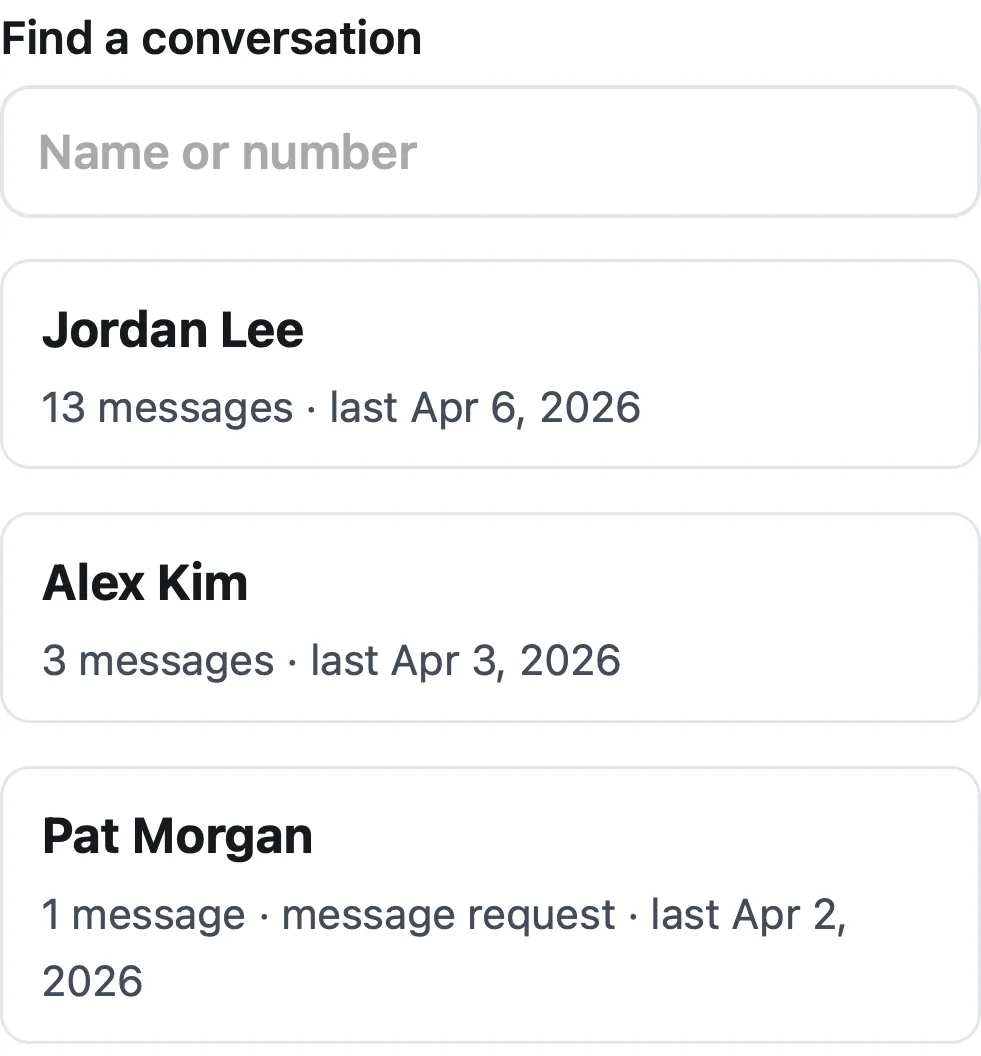
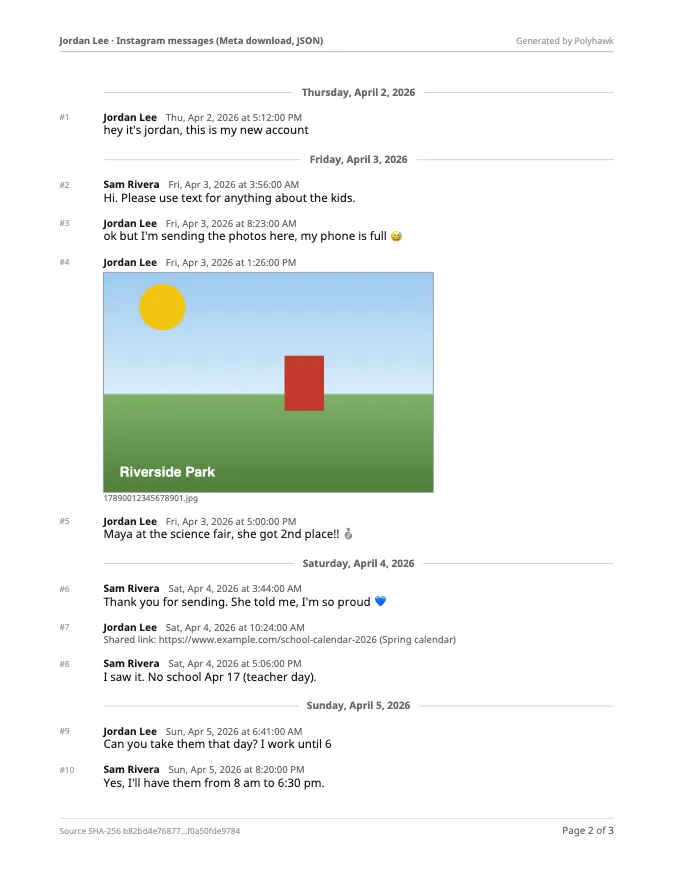
It joins the parts of each conversation, sorts every message by its timestamp, fixes the mojibake (Meta stores “é” as “é”), and puts each photo under the message it was sent with. Shared links, reactions, calls and unsent messages are listed under the message they belong to.
What if Meta sent HTML instead of JSON?
Meta offers both. The HTML version is made to read in a browser, not to process, so the tool recognizes it (files such as message_1.html or start_here.html) and tells you to request the export again with Format set to JSON. The JSON version also keeps exact timestamps to the millisecond, which the PDF shows to the second in your chosen time zone.
How long does it take?
The waiting is on Meta’s side. Once you have the zip, the PDF is quick: our fictional Instagram conversation (13 messages, 1 photo) became a 3-page PDF in 0.2 seconds in both Safari’s engine (WebKit 27.2) and Chrome’s engine (Chromium 159) on a MacBook Air (Apple M4). Listing the conversations in that download took 0.04 seconds.
What do the encryption changes mean for your messages?
Two things to know before you request an export. Instagram’s help page says “End-to-end encrypted messaging on Instagram is no longer supported as of May 8, 2026”. The history of Messenger’s end-to-end encrypted chats comes from the separate encrypted-chat download described above, which needs a computer. If a conversation looks incomplete in the PDF, check both downloads.
For other apps, see WhatsApp to PDF, Android texts to PDF and Telegram to PDF. For how to use the PDF at a hearing, see How to present text messages in family court.
Questions people ask
How long does Instagram take to send my messages?
Instagram's help page says "It may take up to 30 days for us to email you an export link", and that once it's ready "you'll have 4 days to export your information in the Available downloads section". Request it as soon as you know you'll need it.
Can I download just one conversation?
Meta exports all your messages for the date range you choose, not one chat. Choose the whole download here and the tool lists the conversations so you can turn just one into a PDF.
My download came as several zip files. Which one do I choose?
Choose all of them at once. The messages of one chat and its photos can sit in different parts, and the tool looks across every zip you select.
Why does the JSON show "é" instead of "é"?
Meta writes each byte of accented letters and emoji as a separate code, so programs that read the JSON normally show "é" for "é" and strings like "ð\u009f\u0098\u0085" for 😅. Polyhawk decodes them back, so the PDF shows the text as it was written.
Can I download someone else's Instagram or Messenger messages?
No. Meta's export is for your own account, signed in as you, and this tool only reads a download you made. Use your own account and your own conversations.
Does it work with group chats?
Yes. Page 1 lists everyone in the conversation, and every message shows who sent it, with the date and time in the time zone you choose.
Polyhawk is not a law firm and does not give legal advice. Whether a court accepts a document is up to the court and its rules; ask a lawyer or your court's self-help center.
Related
- WhatsApp to PDFTurn a WhatsApp export (.zip or .txt, iPhone or Android) into a PDF with every message, date and time, photos inline and page numbers. Nothing uploaded.
- Android texts to PDFBack up your Android texts with SMS Backup & Restore, then turn one conversation into a PDF with every date, sender and MMS photo. Nothing uploaded.
- Save a WhatsApp chat for legal useExport the chat with media from your own phone, keep the original .zip unchanged, and make a dated PDF that records the file's SHA-256 fingerprint.
- Texts in family courtPrint the whole conversation with numbers, dates and times, bring the copies your court asks for, and be ready to say it's accurate. With official sources.
- All Polyhawk toolsTurn your texts and chats into a clean PDF for court