WhatsApp export chat limit (messages and media)
WhatsApp's help page states no message limit today (checked November 22, 2026). It used to: in 2023 it said 10,000 messages with media and 40,000 without, and from 2024 to April 2025 "up to 100,000 latest messages". Some things are never exported, such as view-once messages. Check the first date and the message count of every export before you rely on it.
What does WhatsApp say about export limits today?
Nothing. We read WhatsApp’s Export chat help page for Android, iPhone and Web on November 22, 2026, in English, German, Spanish, Portuguese, French and Hindi, and none of them gives a maximum number of messages.
It wasn’t always so. The Internet Archive’s copies of the same page show the history:
| Copy of the page | What it said |
|---|---|
| February 2023 | “When exporting with media, you can send up to 10,000 latest messages. Without media, you can send 40,000 messages. These constraints are due to maximum email sizes.” |
| February 2024 to April 2025 | “When exporting with media or without media, you can send up to 100,000 latest messages.” |
| October 2025 onward | No limit stated |
The page doesn’t say whether the limit was removed or only taken off the page. That’s why the safest habit is to check every export: the date of its first message, and how many messages it has.
What does a WhatsApp export never include?
Whatever the limit, WhatsApp’s own pages say some things don’t go into an export:
- View-once messages. The iPhone page: “View once messages will not be exported.”
- Disappearing messages. The WhatsApp Web page: “View once and disappearing messages won’t be exported.” If disappearing messages are on in a chat, the export holds only what’s still visible.
- Media from WhatsApp Web. “Media isn’t included, unlike exporting chats on your mobile device.”
- Older media on Android. With Include media, “the most recent media sent will be added as attachments”.
- Anything not on the phone. An export is made from the chat on that device. If you got a new phone and didn’t restore your backup, older messages aren’t there to export.
The Windows app doesn’t export at all (“This feature isn’t available on this plaform”, sic).
How do you check whether your export is complete?
Choose it below. The tool reads it on your device (a 100,000-message export took 0.2 seconds on our test laptop) and shows the first and last message dates, the number of messages from each person, and a preview of the first messages, before you make any PDF.
Turn a WhatsApp chat export into a PDF
Get the file: in WhatsApp, open the chat. iPhone: tap the contact or group name, then Export chat. Android: tap ⋮ › More › Export chat. Choose with or without media and save it (on iPhone, Save to Files). Then choose the .zip or .txt here.
Get the file: on Android, the free SMS Backup & Restore app saves your texts as an .xml file (its name starts with sms-). Choose that file here. Big backups with photos are fine: the file is read in small pieces, on your device.
Get the file: in Instagram or Facebook, go to Accounts Center › Your information and permissions › Export your information › Create export › Export to device. Pick Messages and set Format to JSON. When Meta's email arrives, download the zip and choose it here (if there are several zips, choose them all).
Get the file: in Telegram Desktop (on a computer), open the chat, click ⋮ › Export chat history, and set Format to Machine-readable JSON. Choose result.json here, or a zip of the export folder to include photos.
No export on iPhone? Take screenshots of the conversation (side button + volume up), then choose them here. Each one goes on a page in order, with its file name, date and SHA-256 fingerprint. Text in the screenshots is not read or retyped.
What page 1 will say
Preview of the messages
Pro is coming soon · $9.99 per export or $24.99 lifetime
- The clean PDF, with no “Preview” watermark on its pages
- A one-time price, no subscription
- Every source: WhatsApp, Android texts, Instagram, Messenger, Telegram, screenshots
Everything above is free while we launch. Leave your email and we'll write once, when Pro is ready.
Runs in your browser. Nothing is uploaded. No sign-up.
Compare the first date with what you see when you scroll to the top of the chat on your phone. If the export starts later than the chat does, the missing part either wasn’t on the phone or was cut off, and an export from a phone with the full history (or a backup restored first) is the fix.
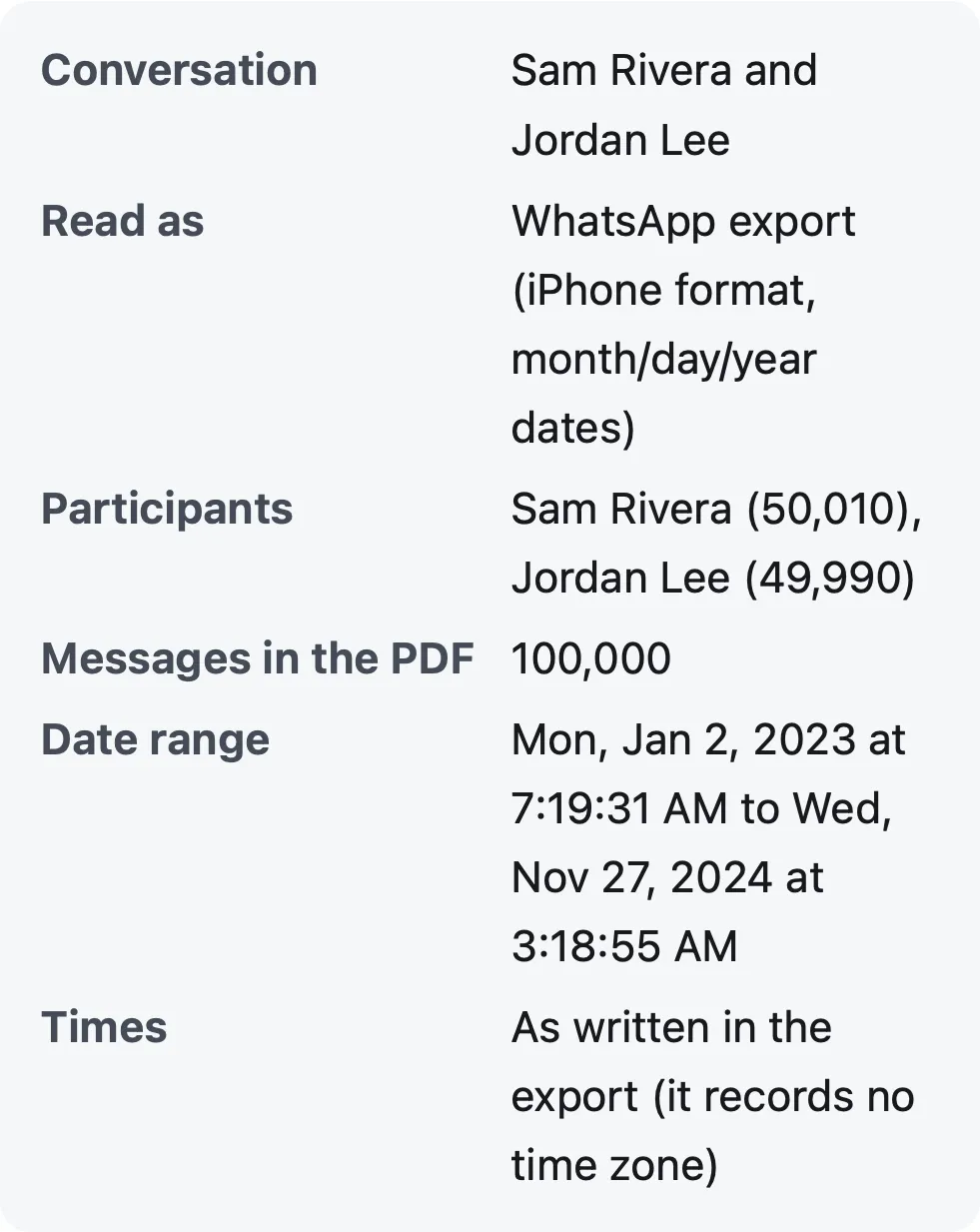
Can a PDF handle 100,000 messages?
Yes. We made a fictional 100,000-message iPhone-format export (the 2024–2025 limit) and ran it through this page’s tool on a MacBook Air (Apple M4, 16 GB):
| Export | Read the file | Make the PDF | Pages | PDF size |
|---|---|---|---|---|
| 100,000 messages, Safari’s engine (WebKit 27.2) | 0.2 s | 5.5 s | 5,557 | 10.6 MB |
| 100,000 messages, Chrome’s engine (Chromium 159) | 0.2 s | 5.7 s | 5,557 | 10.6 MB |
| 50,000 messages, both engines | 0.1 s | 3.0 s | 2,824 | 6.6 MB |
A phone is slower than this laptop, but the tool works in small steps, shows its progress and keeps the page responsive. A 5,557-page PDF is a lot to print, though: for a hearing, a date range covering the relevant period is usually more useful, and page 1 records the range you chose.
What if the export is too big to send?
WhatsApp’s 2023 page tied its limits to “maximum email sizes”, because exports were often sent by email. You don’t need to email it anywhere to use this page: on iPhone, choose Save to Files in the share sheet, and on Android save it to the phone or Google Drive, then choose it here. The file is read on your device.
For the full export steps, see WhatsApp to PDF; for keeping an export as evidence, How to save a WhatsApp chat for legal purposes. Telegram has its own export settings, covered in Telegram to PDF.
Questions people ask
Is there a limit to how many WhatsApp messages you can export?
WhatsApp's help page doesn't state one now (checked November 22, 2026). Archived copies show 10,000 messages with media and 40,000 without in 2023, then "up to 100,000 latest messages" from February 2024 to April 2025. The line is gone from copies since October 2025.
Why does my WhatsApp export not include all the messages?
Check four things: whether the phone still has the older messages (an export holds only what's in the chat on that phone), view-once and disappearing messages (never exported), a limit that applied when the export was made, and whether you exported from WhatsApp Web with a custom date range.
How do I export more than 40,000 WhatsApp messages?
Export again with a current version of WhatsApp: the 40,000 figure is from WhatsApp's 2023 help page, and today's page states no limit. Then check the first date in the export, for example in this page's preview.
Does exporting with media lower the limit?
It did in 2023 (10,000 with media, 40,000 without). From 2024 to April 2025 the page gave one figure for both (100,000). Today's page gives none, but notes on Android that "the most recent media sent will be added as attachments".
Can I export only part of a WhatsApp chat?
On WhatsApp Web you can choose "Custom date range" (without media). On a phone, export the whole chat and limit the PDF here with the From and To dates; page 1 then says which range it covers.
Does a WhatsApp export include deleted messages?
No. A message deleted for everyone appears as "This message was deleted" (or "You deleted this message"), and the PDF shows that line, marked as deleted.
Polyhawk is not a law firm and does not give legal advice. Whether a court accepts a document is up to the court and its rules; ask a lawyer or your court's self-help center.
Related
- WhatsApp to PDFTurn a WhatsApp export (.zip or .txt, iPhone or Android) into a PDF with every message, date and time, photos inline and page numbers. Nothing uploaded.
- Save a WhatsApp chat for legal useExport the chat with media from your own phone, keep the original .zip unchanged, and make a dated PDF that records the file's SHA-256 fingerprint.
- Telegram to PDFExport a chat from Telegram Desktop in JSON, then turn result.json into a PDF with every message, date and time, photos and page numbers. Nothing uploaded.
- All guidesEvery Polyhawk guide, by task.